

- Notes
- Images
- Links
- Attachments

- Paste content from the clipboard
- Drag text, images, or links directly from a webpage
Different Ways to Add Content
Even when the resulting content looks similar, adding it to a board can have different meanings. Depending on where the content comes from and how you want Bentowise to manage it, you can choose from four basic actions: Create / Import from / Link to / Paste from Each represents a different relationship between the board and the original content.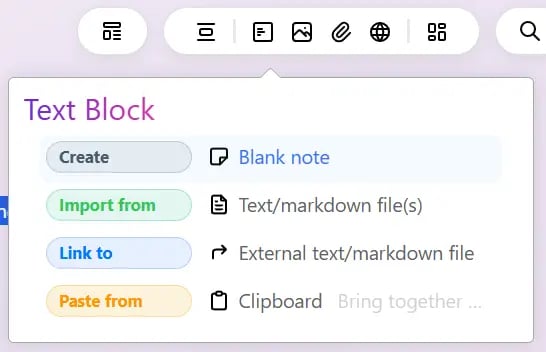
Create
Use Create when you want to create new content directly inside Bentowise. For example, you might create a new note and type your own thoughts, observations, or conclusions. Create means the content originates in Bentowise.Import from
Use Import from when you want to bring existing external material into Bentowise, such as an image, document, or other local file. Imported resources become locally managed content inside the Vault. They can therefore be stored and backed up together with the board, and can also follow the Vault when you sync it across devices using a third-party sync service. Import means the resource becomes part of the Vault.Link to
Not every resource needs to be copied into the Vault. Use Link to when you want to create a reference or shortcut while leaving the original content in its existing location. This is useful for linking to:- Webpages and online resources
- Shortcuts to local files
- Other Bentowise Boards
- Other resources you want to access from the board