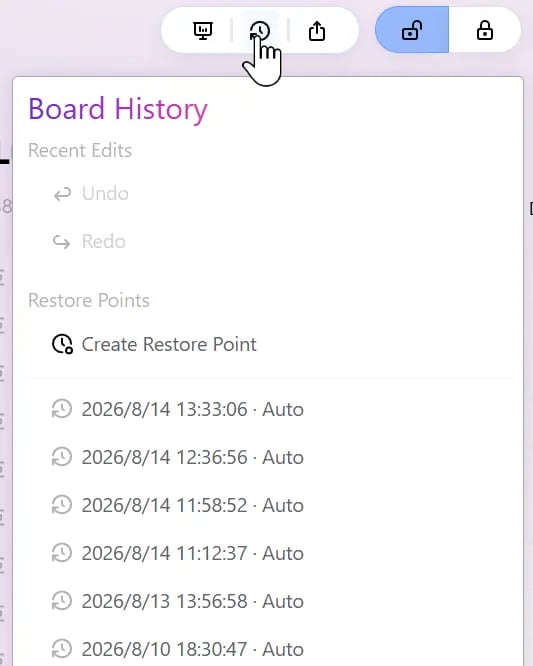
This feature was introduced in Bentowise V2. Restore Points give each Board a lightweight history and recovery system. Bentowise automatically saves snapshots at important moments, so you can return to an earlier state after major edits, structural changes, or imported content. Snipaste 2026 08 14 13 33 36

Automatic Restore Points

You do not need to create a snapshot for every change manually. Bentowise automatically creates Restore Points at key moments, including:
  • each time you open a Board
  • when you import Blocks into a Board
This means you usually have a recent state to return to before starting a new work session or making a larger change.

Manual Restore Points

In addition to automatic snapshots, you can also create a Restore Point manually whenever you want to preserve the current state of a Board. This is useful before major restructuring, large imports, template changes, or any experiment you may want to roll back later. Manual Restore Points let you mark meaningful milestones instead of relying only on automatically generated history.

Restore an Earlier Version

You can open a Board’s History to view available Restore Points and restore an earlier version. A Restore Point captures the Board as it existed at that moment, including its content and layout. This makes it more useful than repeatedly using Undo when you need to recover from a larger change. For example, you can restore an earlier snapshot after reorganizing many Blocks, trying a different structure, or importing content that did not work as expected.

Restore History Is Limited

Restore Points are not an unlimited version archive. Bentowise keeps the most recent history snapshots. Once there are more than 20 Restore Points, older versions are gradually discarded. For this reason, Restore Points are best used as a safety net for recent changes rather than as a long-term archive. If you need to preserve a specific version of a Board for the long term, consider exporting the Board or backing up the entire Vault.

Stored Inside the Vault

Restore Points are stored inside the Vault folder. This means they move with the Vault when you copy, back up, or sync it. For example, if you sync the Vault to another device with a third-party sync service, or copy the entire Vault to a new computer, its Restore Points are included as well. So a simple rule is: Back up the Vault → back up its Restore Points. Restore Points are not meant to record every small change. Their purpose is to provide a reliable safety net for everyday work: Make changes freely, and return to an earlier state when needed.